

User guide#
This page provides some motivation to the design choices for surface-sim.
Model, Layout, and Detectors objects#
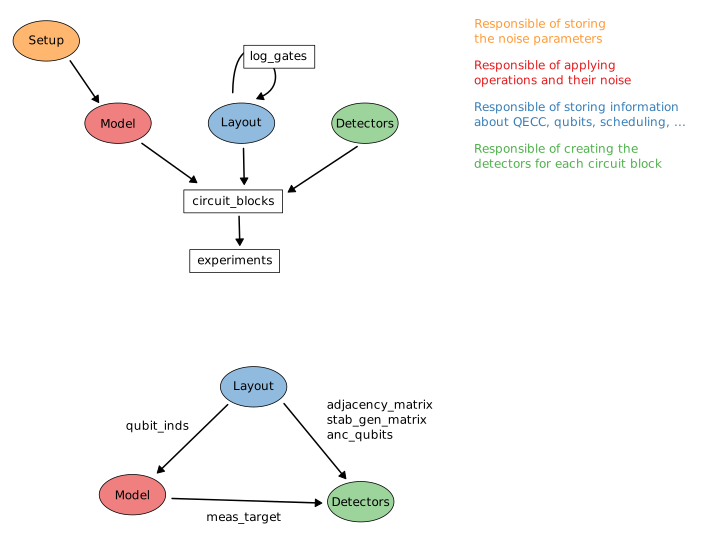
The noise model class contains the functions that implement noisy operations and the layout class contains the possible interactions between qubits.
The detectors are managed automatically using the Detectors class.
For an overview of the relations between these classes, see the figure at the end of this section.
The Model’s methods for operations return a stim.Circuit corresponding to the specified operation and its associated noise.
These instructions can be added to a stim.Circuit, for example:
# apply an X gate to qubit D1 and D2

circuit = stim.Circuit()
circuit += model.x_gate(["D1", "D2"]):
The building blocks in surface_sim.circuit_blocks use a layout (from surface_sim.Layout), which simplifies the qubit selection for gate scheduling.
As an example, Layout.get_qubits(role="anc") selects all ancilla qubits from the layout.
In docs/source/_static/layout_examples, there is a YAML file that stores the Surface-17 layout, which can be loaded using Layout.from_yaml().
This package also contains functions to generate layouts in surface_sim.layouts.
To understand how to build noisy circuits, we suggest reading the code for the functions in surface_sim.circuit_blocks.rot_surface_code_css.
It is also important to know that every time a new circuit or experiment is build, the Model and Detectors classes need to be restarted with
model.new_circuit()
detectors.new_circuit()
This restarts the inner state of the classes, in particular for the function Model.meas_target and the stabilizers in Detectors.
Finally, this package already contains some common QEC experiments in surface_sim.experiments.
Structure of a logical circuit#
The structure that supported in surface_sim is the following
logical operation layer | QEC round | logical operation layer | QEC round | ...
where in a logical operation layer each logical qubit MUST performs ONE logical operation. A logical operation is a logical reset, measurement, or unitary gate. Logical idling is considered an operaion. A circuit can never have a logical reset followed directly by a logical measurement. There will be always a QEC round between them.
It is possible to perform more than one QEC round between logical operation layers:
logical operation layer | QEC round | ... | QEC round | logical operation layer | QEC round | ...
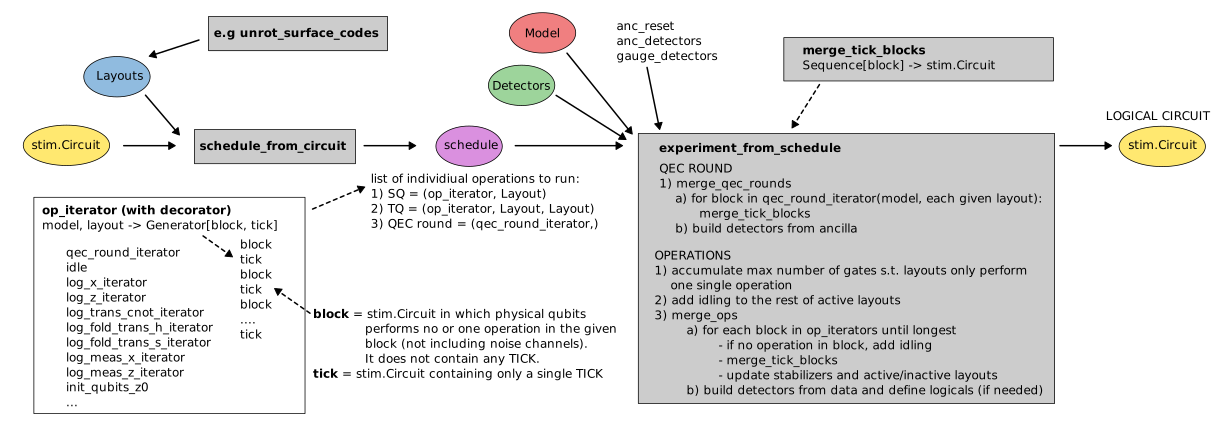
The logical operations must have one model.tick() before starting the physical implementation of the operation.
This TICK is used to add incoming noise (if needed) and to plot the stabilizers before the gate when calling stim.Circuit.diagram.
The TICK must be there to make sure that idling noise is correctly added when the logical operations have different physical gate layers.
Creating and configuring a Setup#
This file contains information on how to create and configure a Setup object for a noise model Model using (1) a YAML file, and (2) a dict object.
This document explains the structure of these two inputs and the use of free parameters and global parameters.
For convenience, surface_sim.setup.CircuitNoiseSetup returns a Setup initialized for circuit-level noise.
Structure of the configuration for a Setup#
The configuration input must contain a setup block, including the noise parameters for each qubit.
It can also contain a gate_durations block for experimental-based noise models, where the error probabilities depend on the opertaions durations.
A common set of noise parameters for each qubits are:
sq_error_prob: float,cz_error_prob: float,meas_error_prob: float, # quantum measurement errorsassign_error_prob: float, # classical measurement errorreset_error_prob: float,idle_error_prob: float,T1: float,T2: float,
Note: not all parameters are required for each noise model
Note: the units of T1, T2 and gate durations must match
The configuration input can also contain a name and a description.
The parameters are classified into three categories:
local parameter: float value that is defined for a specific qubit or pair of qubits for the case of two-qubit gates.
global parameter: float value that is defined for all qubits or all two-qubit gates.
free parameter: string name that can be set up and modified for an specific qubit or all qubits.
These parameters can be setup using the Setup.set_var_param function.
Examples that represent the same noise:
setup_input = [
    {
        "qubit": "D1",
        "sq_error_prob": 0.001
    },
    {
        "qubit": "D2",
        "sq_error_prob": 0.001
    },
    {
        "qubits": ["D1", "D2"],
        "cz_error_prob": 0.01
    },
]
# global parameters
setup_input = [
    {
        "sq_error_prob": 0.001
        "cz_error_prob": 0.01
    },
]
# free parameters
setup_input = [
    {
        # global free parameter
        "sq_error_prob": "param1"
    },
    {
        # local free parameter
        "qubits": ["D1", "D2"],
        "cz_error_prob": "param2"
    },
]
# set the free parameters once the Setup object has been created:
# setup.set_var_param("param1", 0.001)
# setup.set_var_param("param2", 0.01)
Loading Setup from YAML file#
from surface_sim import Setup

setup = Setup.from_yaml("path/to/yaml/file.yaml")
Examples of the YAML Setup file can be found in docs/source/_static/setup_examples.
Creating Setup from dict#
from surface_sim import Setup

setup_dict = {
    "gate_durations": {
        "X": 3.2,
        "Z": 1,
        "H": 1,
        "CZ": 1,
        "M": 1,
        "R": 1,
    },
    "setup": [
        {
            "cz_error_prob": 0.1,
            "meas_error_prob": 0.1,
            "assign_error_flag": True,
            "assign_error_prob": 0.1,
            "reset_error_prob": 0.1,
            "idle_error_prob": 0.1,
            "T1": 1,
            "T2": 1,
        },
        {
            "qubit": "D1",
            "sq_error_prob": 0.001
        }
        {
            "qubit": "D2",
            "sq_error_prob": 0.002
        }
    ],
    "name": "test",
    "description": "test description",
}

setup = Setup(setup_dict)